Understanding how to withdraw money from Ramzan card 2026 is essential after receiving your Nigehban ATM card from Punjab’s historic relief package or PM’s national Ramzan assistance program. The good news: withdrawal is simple, secure, and available at over 20,000 branchless banking outlets across Pakistan.
This comprehensive guide explains every method to withdraw your Rs 10,000-13,000 Ramzan relief using ATMs, mobile wallets, and authorized agents. You’ll learn step-by-step withdrawal procedures, security precautions to prevent fraud, troubleshooting common issues, and alternative withdrawal methods if standard ATM access fails. Whether you received the Nigehban Card, Ehsaas Card, or PM relief funds, this article provides complete instructions for accessing your Ramadan assistance within hours of receiving your card.
Understanding Your Ramzan Card 2026: Types & Withdrawal Options
Types of Ramzan Cards in 2026
1. Nigehban ATM Card (Punjab CM Package)
- Amount: Rs 10,000 cash + ration benefits
- Card type: Digital ATM card linked to CNIC
- Withdrawal methods: ATM, branchless agents, Bank of Punjab branches
- Validity: Can be reused for future welfare programs
- Issued by: Punjab Government through PSER
2. PM Relief Card (National Package)
- Amount: Rs 13,000 direct cash assistance
- Delivery method: Direct bank transfer or ATM withdrawal
- Withdrawal methods: ATM, mobile wallet, authorized agents
- Coverage: All provinces nationwide
- Issued by: Prime Minister’s Office through BISP
3. Ehsaas Rashan Card (Ration Plus Cash)
- Amount: Rs 10,000 cash + ration bag worth PKR 3,000
- Card type: Dual-purpose (shopping + cash)
- Withdrawal methods: Cash withdrawal at agents, shopping at utility stores
- Validity: Active throughout Ramadan and beyond
- Issued by: Provincial administrations
Step-by-Step: How to Withdraw Money from Ramzan Card
METHOD 1: ATM Withdrawal (Fastest)
Step 1: Locate a Nearby ATM
- Find Bank of Punjab (BOP) ATM
- HBL, UBL, or other major bank ATMs
- Use Google Maps search: “ATM near me”
- Call helpline 0800-02345 for ATM locations
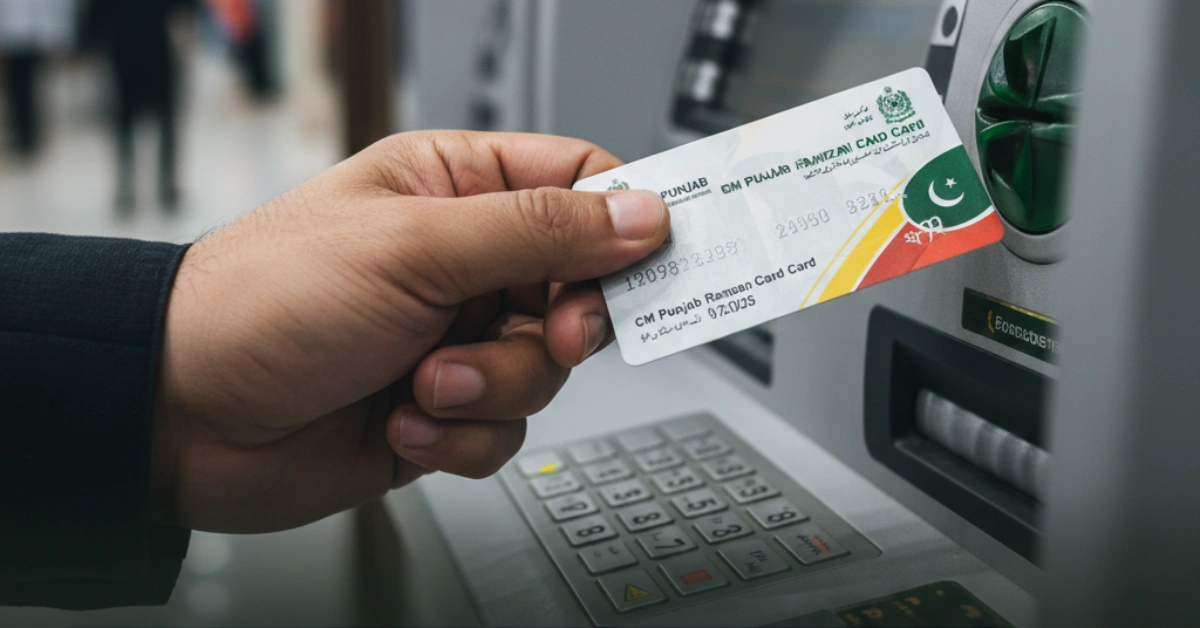
Step 2: Insert Your Card
- Take your Nigehban/Ramzan ATM card
- Insert card into ATM machine (chip-side first)
- ATM screen displays “Card Accepted”
Step 3: Enter Your PIN
- If first-time user: Set 4-digit PIN at ATM
- Follow on-screen instructions
- Enter PIN securely (shield keypad)
- Press “OK” or “Confirm”
Step 4: Select Withdrawal Amount
- ATM displays available balance (Rs 10,000 or Rs 13,000)
- Choose withdrawal amount options (Rs 1,000 to Rs 10,000)
- Select “Withdraw Rs [AMOUNT]”
- Press “Confirm”
Step 5: Complete Transaction
- ATM dispenses cash
- Receipt prints (take for records)
- Card is automatically returned
- Withdraw card and keep safely
Time required: 3-5 minutes Charges: Zero (completely free)
METHOD 2: Branchless Banking Agents (If No ATM Available)
Pakistan has 20,000+ branchless banking outlets where Ramzan card withdrawal is available:
Popular Outlets:
- HBL Konnect agents
- UBL Omni agents
- AlfaPay outlets
- Bank of Punjab agents
- Easypaisa shops
- JazzCash outlets
Withdrawal Process:
Step 1: Visit Nearest Agent
- Find agents using Google/SMS
- Bring your Ramzan card
- Have CNIC ready
- Know your PIN
Step 2: Request Withdrawal
- Tell agent: “I need to withdraw cash from my Ramzan card”
- Agent inserts your card into point-of-sale (POS) machine
- Agent enters withdrawal amount
Step 3: Biometric Verification
- Place thumb on fingerprint scanner
- Face-scan verification (some outlets)
- Agent confirms identity in BISP database
- Verification takes 10-30 seconds
Step 4: Enter PIN & Confirm
- Agent asks for your 4-digit PIN
- You enter PIN on POS machine
- Verify amount is correct
- Confirm transaction
Step 5: Receive Cash
- Agent counts cash
- You verify amount is correct
- Agent provides receipt
- Transaction complete
Time required: 5-10 minutes Charges: Zero (no fees from government)
(Internal link suggestion: link to your article on “Ramzan card agent locations Pakistan”)
METHOD 3: Bank of Punjab Branch Withdrawal
For those preferring traditional bank branch:
Step 1: Visit Bank of Punjab Branch
- Locate nearest BOP branch
- Open Monday-Friday, 9 AM-4 PM (Ramadan adjusted hours)
- Bring original CNIC + Ramzan card
Step 2: Request Cash Withdrawal
- Meet customer service representative
- State: “I want to withdraw Rs 10,000 from my Ramzan card”
- Provide card and CNIC
Step 3: Complete Forms
- Sign withdrawal form
- Provide CNIC copy
- Confirm identity
- Specify withdrawal amount
Step 4: Biometric Verification
- Fingerprint verification required
- Face recognition scan (some branches)
- Verification confirms you in PSER/BISP database
Step 5: Receive Cash
- Teller counts cash carefully
- Verify amount received
- Sign receipt
- Keep receipt for records
Time required: 10-20 minutes Charges: Completely free
METHOD 4: Mobile Wallet Transfer (Digital Withdrawal)
For those with mobile accounts:
Step 1: Check Mobile Account Eligibility
- Confirm your mobile is registered under CNIC
- Ensure account is active
- Have recent transaction history (shows active use)
Step 2: Receive SMS from BISP/Government
- SMS: “Your Rs 10,000 has been transferred to your [WALLET] account”
- Verify SMS is from official number
- Do NOT respond to suspicious SMSes
Step 3: Open Mobile Wallet App
- Open JazzCash, Easypaisa, or HBL app
- Check account balance (should show Rs 10,000 credit)
- Verify transaction in “Recent Transactions”
Step 4: Withdraw to Cash
- Option A: Visit nearest JazzCash/Easypaisa/HBL agent
- Option B: Transfer to bank account
- Option C: Use for mobile-enabled shopping
Step 5: Collect Cash
- Agent withdraws funds
- No additional charges
- Instant cash in hand
Time required: 5-15 minutes (depending on agent queue) Charges: Zero (government-subsidized)
Withdrawal Method Comparison Table
| Method | Location | Time | Verification | Charges | Best For |
|---|---|---|---|---|---|
| ATM | 5,000+ ATMs nationwide | 3-5 min | PIN only | Free | Tech-savvy, speed priority |
| Branchless Agent | 20,000+ outlets | 5-10 min | Fingerprint/Face | Free | Rural areas, non-banked |
| Bank Branch | 100+ BOP branches | 10-20 min | CNIC + Biometric | Free | Those wanting official receipt |
| Mobile Wallet | Any agent | 5-15 min | Phone number | Free | Digital users |
| Ration Shop | Local utility stores | N/A | CNIC | Free (shopping) | Direct goods purchase |
Security: How to Protect Your Ramzan Card While Withdrawing
Critical Safety Rules
✓ Never share PIN with anyone, including government officials ✓ Never respond to SMS asking for PIN, OTP, or CNIC ✓ Never accept help from strangers at ATM or agent ✓ Always use official channels (ATMs, authorized agents) ✓ Verify agent legitimacy before inserting card ✓ Check balance immediately after withdrawal ✓ Keep receipt for records (proof of withdrawal) ✓ Report lost/stolen cards immediately to helpline 0800-02345
Common Scams to Avoid
Scam 1: Fake Government SMS
- Fraudsters send: “Confirm withdrawal by clicking link”
- Reality: Government never asks for confirmation clicks
- Action: Delete suspicious SMS, call official helpline
Scam 2: Registration Fees
- Fake message: “Pay Rs 100 for card activation”
- Reality: Ramzan cards are 100% free, no activation fees
- Action: Ignore and report to 0800-02345
Scam 3: Fake Agents
- Fraudster poses as agent, asks for card
- Reality: Never hand card to unknown person
- Action: Use official ATM or verified branchless outlets only
Scam 4: Phishing Websites
- Fake website claims to verify card balance
- Reality: Genuine verification via SMS 8070 only
- Action: Never enter CNIC on suspicious websites
Troubleshooting: What If You Can’t Withdraw?
Common Issues & Solutions
| Issue | Reason | Solution |
|---|---|---|
| ATM rejects card | Card not activated yet | Visit agent/BOP to activate, then retry ATM |
| “Card Not Found” error | Card not linked to CNIC | Call 0800-02345 to verify card registration |
| PIN forgotten | Never set PIN initially | Reset at ATM or agent point |
| Insufficient balance | Card shows zero balance | Verify eligibility via SMS 8070, confirm transfer |
| “Biometric failed” | Fingerprint not recognized | Try different finger or face scan option |
| Agent says card expired | Card validity period ended | Contact helpline 0800-02345 for new card |
| Withdrawal limit exceeded | Daily ATM limit (usually Rs 10,000) | Withdraw in sections or use agent instead |
FAQ: How to Withdraw Money from Ramzan Card 2026
Q1: Do I need to carry my CNIC card every time I withdraw from my Ramzan card?
A: Not always. For ATM withdrawal: only need card and PIN. For agent withdrawal: biometric verification sufficient (fingerprint/face scan confirms identity). For bank branch: need original CNIC. Best practice: carry CNIC always—some ATMs may ask for verification if unusual activity detected.
Q2: What is the daily withdrawal limit from my Ramzan card at ATM?
A: Most Pakistani bank ATMs allow Rs 10,000-50,000 daily withdrawal. Since your Ramzan card typically holds Rs 10,000-13,000 total, you can withdraw entire amount in one transaction. Some older ATMs may have Rs 20,000 limit (withdraw full amount in two visits). Agent withdrawal has no daily limit—you can withdraw full amount at once.
Q3: Can someone else withdraw money using my Ramzan card if they know my PIN?
A: Yes, they could potentially withdraw. This is why PIN security is critical. If PIN is compromised: (1) Immediately call helpline 0800-02345, (2) Block the card, (3) Report fraudulent withdrawals, (4) Request new card replacement. Never share PIN with anyone, even family members or government officials.
Q4: What if I don’t want to withdraw cash but want to use card for shopping instead?
A: You can! Ramzan cards work at registered utility stores and grocery merchants for purchasing subsidized items (flour, ghee, sugar, pulses) at discounted rates. Simply present card at checkout—no PIN needed for shopping. Shopping gives you more goods per rupee than cash withdrawal would.
Q5: Can I withdraw my Ramzan card money from any bank ATM in Pakistan, or only specific ones?
A: You can withdraw from major bank ATMs nationwide: HBL, UBL, MCB, Habib Bank, Allied Bank, Bank of Punjab, etc. Government-partnered ATMs marked with Ramzan card logo (usually green/white) work best. If an ATM rejects your card, try different bank ATM nearby—network compatibility sometimes varies. Branchless agents work everywhere.
Conclusion: How to Withdraw Money from Ramzan Card 2026
Learning how to withdraw money from Ramzan card 2026 is straightforward: insert your Nigehban/Ramzan card into any of 5,000+ ATMs nationwide, set your PIN, select withdrawal amount, and collect cash within 3-5 minutes. Alternatively, visit any of 20,000+ branchless banking agents (HBL Konnect, UBL Omni, AlfaPay, JazzCash) for fingerprint-verified withdrawal in 5-10 minutes.
Your Rs 10,000-13,000 Ramadan relief is completely free—no withdrawal fees, no activation charges, no hidden costs. Use secure methods only (official ATMs, authorized agents), protect your PIN fiercely, and report any suspicious activity immediately to helpline 0800-02345.
Withdraw today and use your assistance for Ramadan essentials: Sehri, Iftar, and Eid preparations. This government support was designed specifically for your family’s dignity during this blessed month.